


Netspend
4.622.17K Reviews
App Specs
- Version
- 7.0.15
- Updated On
- License
- Free
- Downloads
- 10,000,000+
- Developer
- Netspend Corporation
- Categories
- Finance
- Platform
- Android, iOS
Screenshots
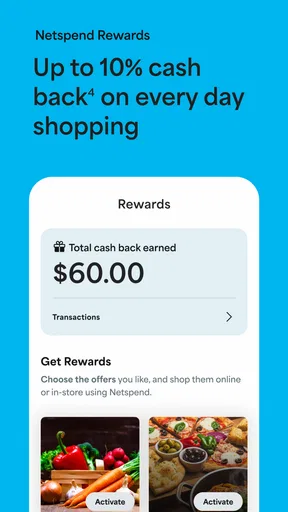
 Analysis by AppCompare
I judge a finance app less by how many screens it offers than by whether it helps me make a quick, sensible decision when money is moving. With Netspend, the useful question is whether its account access, deposit tools, and spending awareness fit the way I already handle everyday finances. I’d treat it as a practical companion to a Netspend account, not as an all-purpose replacement for every bank or budgeting service.
What I expect from everyday speed
For routine checks—opening the app, looking at an account, or reviewing a transaction—I want a finance app to feel direct rather than make me hunt through menus. The interface here is described as intuitive, and the main value is having account information and money-management tools together. I would still separate a quick app response from the speed of a financial transaction: a screen loading promptly does not mean a deposit or payment has finished processing.
That distinction matters when timing is tight. If I’m checking whether a deposit arrived before paying a bill, I’d use the app to confirm the account activity, but I wouldn’t assume that every transfer or deposit appears at the same moment it is initiated. For an urgent payment, I’d leave room for processing and verify the transaction status rather than relying on a notification alone.
Busy days and useful routines
Netspend makes most sense when I build a small routine around it instead of opening it only after something goes wrong. A quick balance check before errands, followed by a look at recent transactions later in the day, can make it easier to spot a purchase I don’t recognize. Alerts for deposits, low balances, and transactions can help with that, especially if I choose notifications that answer a real question rather than turning on every possible prompt.
A useful, slightly less obvious approach is to treat a low-balance alert as a planning threshold, not as a warning that arrives at the last possible moment. I’d set it high enough to leave time to adjust spending or move money through whatever options are available to me. I’d also review the account after a direct deposit lands, then check that any recurring commitments I expect to pay still fit the balance. That turns the app into a simple checkpoint rather than a substitute for planning.
Reliability is more than a successful login
Financial apps need to earn trust through ordinary moments: a clear account view, understandable activity, and a way to respond when something looks off. Security matters just as much. The original review describes secure encryption and the option of a PIN or biometric login; I see those as sensible protections, while still using a device lock and keeping login details private. No app’s security setup can make careless sharing of credentials a good idea.
If a balance or transaction does not look right, I’d first check the recent activity and any relevant alert, then contact support rather than repeatedly attempting the same action. A record of what I expected to happen and when is useful when asking for help. The earlier review found support reachable by phone or online and described the response as decent, but a finance app is not a guarantee that every problem will be resolved instantly. For a time-sensitive issue, I’d use the support route that best fits the urgency and keep an eye on the account while it is being handled.
Worth Reading Before You Choose

Flipboard Shows What News Apps Must Do Beyond the Feed

Switching to Android Auto Means Rethinking Your Driving Routine

Google Calendar Makes a Crowded Week Easier to Manage

Ludo King Makes the Most of the Minutes Between Plans

Baby Panda World Brings Quick Play to Modern Phones, but Its Game Library Feels Busy

ESPN’s Live Game View Makes Following Close Games Easier
Device fit and practical limits
The app is free, rated for Everyone, and NetSpend’s finance product has been around since May 23, 2011. Its current version is 7.0.9, with Android support starting at OS 9. It also has a 4.6 average from around 171,000 ratings, and more than 10 million installs. Those figures suggest a widely used app, but they don’t tell me whether it will feel equally smooth on every device or network.
I’d keep the app updated and make sure my phone’s operating system meets that Android requirement before depending on it. On an older or crowded device, any finance app can feel less responsive when storage is tight, the connection is weak, or other apps are competing for resources. I wouldn’t infer that Netspend is unusually demanding, but I also wouldn’t judge account access from one slow session on poor connectivity. If an action matters, I’d wait for a clear confirmation and check the account again before trying it a second time.
Who gets the most from it
This is a better fit for someone who uses a Netspend card or account and wants a phone-based view of deposits, balances, and spending activity. It may also suit a person who values deposit alerts and wants a straightforward way to keep an eye on day-to-day money. The app’s budgeting and spending insights can be useful as prompts for reviewing habits, though I would not treat them as a full financial plan or assume they replace detailed household budgeting.
Someone who already relies on a traditional bank’s app for all accounts may prefer to keep that as the main hub, especially if they need a single view of several institutions. Likewise, if your priority is advanced forecasting, extensive custom reports, or a comprehensive budget across every account, compare dedicated budgeting tools before switching your routine. The practical test is simple: do the accounts and tasks you want to manage belong in the Netspend setup? If not, another app may fit better.
A realistic payday check-in
Imagine payday arrives while I’m out running errands. I can check whether the expected deposit appears, review the balance, and decide whether a planned purchase still makes sense. If I have transaction alerts enabled, they can help me notice activity as it happens; later, I can review spending categories and see whether the day’s purchases match my budget. The useful point is not that the app makes the decision for me—it gives me a quicker way to gather the information I need.
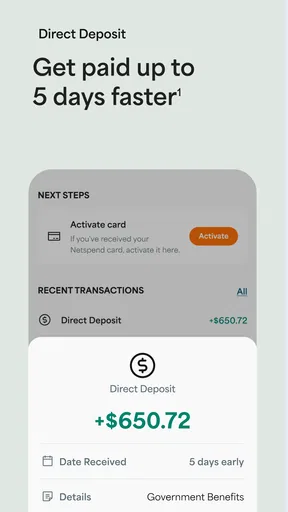
Direct deposit is one of the app’s more relevant conveniences for that routine. The earlier review notes that a paycheck sent to a Netspend card may arrive up to two days faster. I’d regard that as a possible timing benefit, not a promise to plan bills around without checking how my own deposit behaves. Before relying on it, I’d confirm the arrangement with the payer and leave a buffer for important due dates. That small precaution matters more than a best-case estimate when a late payment would cause trouble.
Where it sits among finance apps
Compared with a conventional bank app, Netspend is most compelling when you want to manage the Netspend relationship itself; a bank app may be a more natural choice if your income, bills, and savings already live there. Compared with a standalone budgeting app, Netspend’s appeal is its connection to account activity and deposit alerts, while a dedicated budget tool may offer a broader view across accounts. These are different jobs, so I wouldn’t choose based on feature count alone. I’d choose based on where my money actually sits and what I need to check most often.
One practical trade-off is that notifications can make account activity easier to follow, but too many alerts can become background noise. I’d start with the ones tied to decisions—such as a deposit or a low balance—and adjust after seeing which I genuinely act on. Spending categories are also most helpful when I review them periodically and correct my own assumptions about what the numbers mean; a category label is a starting point for reflection, not financial advice.
Netspend is developed by NetSpend, and its broad adoption—more than 10 million installs—makes it familiar to many users. Still, popularity is not a reason to move every financial task into one app. I’d keep a separate record of important bills and check statements or account activity carefully, particularly when I’m making a decision that depends on an exact balance. That habit is useful with any finance app, and it prevents a convenient mobile view from becoming the only place I look.
Before installing, I’d ask myself three things: do I use a Netspend account, do I want mobile access to its activity, and will alerts or spending reviews help me act differently? If the answers are yes, the app has a clear role. If I’m looking for a universal account dashboard or a detailed budgeting system, I’d compare alternatives first rather than expecting this one app to cover every need.
Ever stumbled across an app that promises to manage your finances effortlessly, and you wonder if it’s the real deal or just another shiny icon on your screen? Well, that was me when I first heard about Netspend. I decided to dive in and see if it could really simplify my financial life. Let’s take a look at what I found.
Getting Started with Netspend
First things first, downloading and setting up Netspend was a breeze. Available on both Android and iOS, the app is pretty lightweight, so it won’t hog your device’s space. Once you’ve got it installed, the registration process is straightforward. You’ll need to provide some basic personal information, which is standard for financial apps, and voila, you’re in.
Features That Stand Out
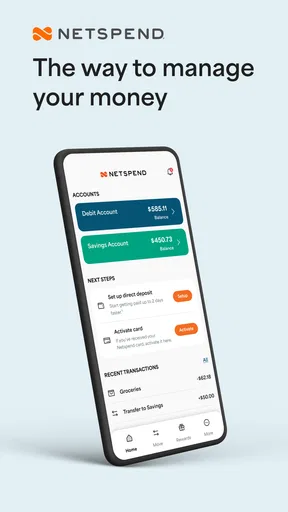
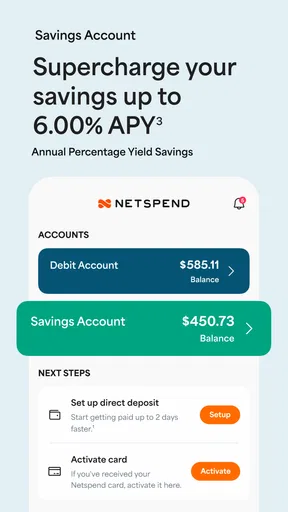
Now, let’s talk features. One thing that caught my attention is the app’s ability to manage multiple accounts. Whether you’re juggling a personal account, a savings account, or even a business account, it handles it all. The interface is intuitive, making it easy to switch between accounts with just a few taps.
Another nifty feature is the ability to set up direct deposits. With this, you can have your paycheck sent directly to your Netspend card. No more waiting in line at the bank or dealing with paper checks. Plus, you can get paid up to two days faster, which is a huge plus if you’re like me and hate waiting for payday.
Budgeting and Spending Insights
If you’re keen on keeping track of your spending, it has got you covered. The app provides insights into your spending habits, allowing you to categorize your expenses and set budgets. It’s like having a personal financial advisor right in your pocket.
One feature I found particularly useful is the alerts system. You can set up notifications for when your balance is low, when a deposit hits, or even when a transaction is made. This level of control and awareness can help you avoid overspending and manage your finances more effectively.
Security and Customer Support
In the age of digital transactions, security is paramount. It takes this seriously with its robust security features. The app uses secure encryption to protect your data, and you can set up a PIN or biometric login for an added layer of security.
And if you ever run into issues or have questions, their customer support is just a call or click away. The response time is pretty decent, and the support team is knowledgeable, helping you sort out any issues quickly.
Final Thoughts
All in all, Netspend is a solid choice for anyone looking to streamline their financial management. It’s user-friendly, packed with features, and offers great security. Whether you’re looking to manage daily expenses, save money, or just keep a closer eye on your finances, this app can be a great tool in your financial toolbox.
If you’re curious to try it out, you can find the download links for both Android and iOS right here on our site. Give it a go and see how it fits into your financial routine. Who knows, it might just be the app you’ve been looking for!
Pros
- User-friendly interface for easy navigation.
- Instant notifications for account activity.
- Customizable budgeting tools.
- Secure login with biometric options.
- Access to savings account with interest.
Cons
- Limited ATM network for free withdrawals.
- Monthly fees can be high for some users.
- Customer service wait times can be long.
- No mobile check deposit feature.
- Requires a fee for balance inquiries.
FAQs for Netspend
What is Netspend and how does it work?
Netspend is a prepaid debit card service that allows you to manage your finances without the need for a traditional bank account. Users can load money onto the card and use it for purchases or withdraw cash. The app provides features like balance tracking, transaction history, and direct deposit options.
Are there any fees associated with using Netspend?
Yes, Netspend may have various fees, including monthly maintenance fees, transaction fees, ATM withdrawal fees, and balance inquiry fees. It's essential to review the fee schedule provided by Netspend to understand the costs involved and choose the plan that best fits your financial needs.
How secure is my money with Netspend?
Netspend uses advanced security measures to protect your funds and personal information. This includes data encryption and secure login features. Additionally, your funds are FDIC-insured up to the legal limit through the issuing bank, providing an extra layer of security.
Can I use Netspend internationally?
Yes, Netspend cards are accepted worldwide wherever Visa or Mastercard are accepted. However, international transaction fees may apply, and it's advisable to check the specific charges for using the card outside the United States to avoid unexpected costs.
How do I load money onto my Netspend card?
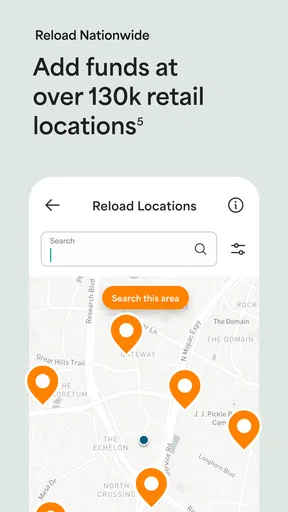
There are several ways to load money onto your Netspend card. You can set up direct deposit, transfer funds from a bank account, deposit checks via the mobile app, or add funds at over 130,000 locations, including retail stores and reload centers. Each method might have specific fees or limits.


